3 pinterest boards you need to have

3 pinterest boards you need to haveAs I’ve shared before, I love Pinterest! For the past year it has been my number one social media referral source, and the more I learn how to use it, the more it helps me grow my audience and build my platform. But, Pinterest is also a great place to curate information that will help you improve as a blogger.  Because Pinterest has so much information and our feeds move quickly, it is important to pin useful information carefully and clearly to make sure you can easily find it later.

As a blogger, I have set up several boards specific to blogging, social media, platform, writing, etc.  Some are public and some are secret. Over the past year, I’ve been evaluating how often I use each of the boards and what information is most useful to me. I’ve found there are three boards I use the most — and these are the three Pinterest boards you need to have!

On My Blog

I pin every post I write to this board. And while it does help me promote my posts, it also serves several other key purposes for me. First, I pin this post after I’ve shared it on other social media. This board serves as my final check for initial promotion of every post. Second, I compare the number of repins from this board to repins from other boards. It helps me measure which boards are most active and to have a baseline since all my posts are pinned here first. Third, I use it to keep track of my images. Since I use a lot of stock photos, I can quickly look at my post images to determine if I’ve used a particular image recently or how I cropped it so I can make adjustments.  Finally, I keep track of the referrals from this board compared to other boards where posts are pinned. I just keep a little checklist in a notebook with a space for each post and where it is pinned. This helps me evaluate which boards are actually seeing clicks vs. repins.

Blogging Tips

This is my go to board when I need to know how to do something or am looking for a way to spice up my blog. I use my Better Blogging board  to collect information about improving every aspect of my blog — from SEO to design and everything in between. I read several blogs every day about blogging and this board allows me to curate the best information I find. This board is especially useful for collecting information I don’t need immediately but want to have quick access to for another time.

Blogging Inspiration

This is one of my “secret” boards. I pin quotes, images, blog posts, book links … just about anything is fair game here. The description on these pins includes the date I pinned it, how I could use it for a blog post, and other notes to help me. I use this board all the time when I’m planning posts or having writer’s block.  Having a board like this is a great help when my schedule is crazy and I need ideas for posts.

Pinterest is amazing, and I love using it to promote my blog posts. But Pinterest is also a fabulous tool for bloggers who want to improve their writing and blogging skills. Here are some of the other posts I have written about Pinterest:

How do you use Pinterest to improve your blogging skills?

building an effective social media strategy {part 5}

building an effective social media strategy - part 5

We’ve spent the past month exploring social media and answering questions about building an effective social media strategy. I hope you have been following along with us and finding the information encouraging and useful. Here is a quick recap of the previous posts:

Part 1: 3 biggest issues with social media {overwhelm, uncertainty, and usage}

Part 2: 3 keys to a strategy that works {schedule, specify, and specialize}

Part 3: 3 questions to help you identify the goals for your blog {and how social media is a part}

Part 4: 6 questions to help build your strategy

It takes discipline not to let social media steal your time.

Alexis Ohanian, co-founder of Reddit

[Read more…]

7 must haves in my everyday blogging toolbox

7 must haves in my everyday blogging toolbox

One of the most common questions I get asked by other bloggers and by my coaching clients is, “How do you do your images?” We bloggers are always looking for great tools, aren’t we? As I have worked on my Blogging 101 and Beyond the Blogging Basics talks for She Speaks, I’ve been taking notes about my process for developing, writing, and promoting posts. I have lots of tips, tricks, and tools I use as a blogger. Most of us do, I imagine.

Today I thought I’d share the seven tools I use every. single. day as a blogger. For me, these are the must haves in my blogging toolbox!

Picmonkey for images

I wish I were as talented as Erin and Phil at graphics, but, alas, I am not. Picmonkey is my go-to photo editing and designing tool of choice. I do have the “royal” membership which costs $33 per year and gives me access to all the fonts and extras available. But the free membership will do everything most bloggers need. With Picmonkey you can add text to images, create collages, and even use a blank canvas to make your own graphics from the elements they offer. I use Picmonkey every day for blog post images {except the ones for posts on DBI which are done by Erin} as well as buttons for my sidebar, Facebook cover images, Instagram posts, etc.

Feedly for reading blogs

I subscribe to over 300 blogs via RSS. Obviously I don’t get those in my inbox every day. {Yikes! Can you imagine?} My reader of choice is Feedly. I tried several different readers when Google Reader was discontinued and landed on Feedly because it looks great on my computer, my iPad, and my iPhone and has all the functionality I needed including the ability to save and share. I have all the blogs I subscribe to divided into categories so I can quickly scan ones on different topics. Erin wrote a great post on reader options last year if you want information about other options.

Pocket for saving information

As a social media coach, I often read articles I want to save for future reference. As a blogger, it is common for me to read a post I want to mention to my readers or on social media. As a speaker, I like to save illustrations and statistics to use in talks. But I don’t like to have all this information in my bookmarks or email. Hello, Pocket! I just add all those posts and articles and images to my Pocket where I can tag them for easy searching later.  And, one of my favorite features of Feedly is the ability to save posts to Pocket.

JetPack Stats for evaluating posts

JetPack is super simple and definitely a tool I use every day {multiple times every day if I’m honest}.  For me, JetPack Stats is less about page views and more about referral sources. For example, Pinterest is my top referral source after search engines. I often click on the links to the pins in my referral list and leave a quick comment on the pin to thank the pinner for sharing my post.  I also use JetPack to share older posts on Facebook, Instagram, and Twitter. When a post from a year or two ago is viewed multiple times in a day, I will share that link via social media. And I always make note of the search engine terms leading to my blog — this is a great way to know what to write!

Google Analytics for evaluating posts

Google Analytics is my go to research point for my blog. The most important information I get from Analytics is the referral information. Analytics provides far more detail in this area than JetPack. I especially use this information to determine how much impact posts I write on other sites has on my blog. For example, besides DBI, I write for three other sites every month. I track the referrals from these sites. I have used this information to determine if I should continue to write for specific sites. Another great piece of information I gain from Analytics is behavior flow … what are readers doing when they get to my site.

Instagram for sharing posts and more

I LOVE Instagram! It is my very favorite social media site. There are countless ways I use it {and even more ways I have noticed others using it}. The two main uses I have for IG are sharing posts {which means I need square images!} and testing out post ideas. The first one is pretty self-explanatory, but here is what I do with the second. Often I share a quote or thought I’ve had after reading a book or listening to a talk. I gauge response to those posts to determine if they are the type of idea worth expanding into a blog post. IG is also a great way to connect with others and build community.

Pinterest for exploring post ideas and updating graphics

Pinterest, as I mentioned above, is a fabulous referral source for me. But I also use Pinterest for research. Did you know you can see what posts have been pinned from your website? Go to www.pinterest.com/source/designbyinsight.net {insert your blog name in place of ours}. I check this every day for all the sites I write for. I want to know if my posts are pinning — and what other posts from those sites are especially popular. This helps me formulate post ideas and determine what sort of graphics are pinning well. I also check this for my personal blog as well for the same reasons.  However, I have found an additional benefit to checking Pinterest this way: updating post images. If you started blogging pre-Pinterest, you remember we didn’t always add text to our images.  When I notice a post is pinned without a text-enhanced image, I make a priority of updating the image.

So there you have it, my everyday tools for blogging. What are the must have items in your blogging toolbox?

you are a content curator: four ideas for using pinterest to build your brand

Recently I was reminded we are all content curators. We bookmark pages, subscribe to blogs, share photos and articles on Facebook, and tweet information. We’re building our own online scrapbooks. Everyone, not just bloggers.

you are a content creator - four ideas for using pinterest to build your brand

Perhaps the most obvious tool for this content curating is Pinterest. Oh how we love Pinterest! {My husband mocks me because I have so many boards.} According to Expanded Ramblings, 48.7 million people have Pinterest accounts. While this feels small in comparison to the 1.11 billion on Facebook, 100 million Instagrammers, and 500 million Twitter users, bloggers and businesses alike have found Pinterest is a top referral source. In other words, you need a Pinterest plan. 

Your Pinterest boards are a valuable tool for branding yourself, marketing your products, and curating the information your readers and customers can use.

Here are four ideas for improving your content curation using Pinterest.

Create themed boards.

The ability to create boards based on certain subjects allows followers to understand your brand’s personality and what’s important to your online store. Why Pinterest Is So Important for Online Stores 

Authors like Tricia Goyer use themed boards to reflect the topics of their books. Her Seven Brides for Seven Bachelors board relates to her current Amish fiction series. With pins about quilts, Amish communities, and simple living, this board definitely curates information the readers of her books will find interesting.

Highlight your popular products.

People like popular products. When they know that a product is selling well and everyone else is buying it, they want to get a hold of it before they miss out. This is one of the reasons why there’s the Amazon bestseller list and the option to look at the most popular products on online stores. How to Use Pinterest to Promote Your Products

Popular jewelry designer, The Vintage Pearl, created a Mother’s Day product board. By highlighting products especially suited for moms, the board provided a great resource for individuals searching for a beautiful gift for mom.

Provide useful information for your readers or customers.

Think about boards that would speak to the obvious themes, subjects, areas of interest, and issues that are important to your clients and potential clients. Many of your boards will fit into this category since topics of interest are what you want to focus on to draw visitors to your boards. This can also include ideas that aren’t spot-on with your business but are related in some way. 8 Pinterest Boards Worth Creating for Your Business

Your readers and customers will appreciate having a place to find that useful tip or great resource. As a social media coach, I’ve created a board with relevant information about social media including suggestions for time management, ideas for social media updates, and information about using social media well and ethically.

Make images on your blog or website pinnable.

Make it as easy as possible for people to pin your stuff. Include images on every page and blog post throughout your website and include Pinterest in your social media share buttons (at the bottom of every blog post). Make sure your websote logo (or header image) is pin-able (many aren’t). I can’t tell you how many times I’ve wanted to pin an article but couldn’t because there wasn’t an image to pin! Pinterest: A Visual Marketing Tool for Writers and Bloggers

Our editor, Sandra Peoples, does a fabulous job of creating pinnable images for the posts on her editing site, Next Step Editing. If you check out my writing board, you’ll see many pins from Sandra’s posts because the information is excellent and easy to pin!

One other tip:  Keep up with the changes Pinterest is making. Check out Products Added to Pinterest to learn more about how you can improve your product, recipe, and movie pins. Our friend Kristin Schell shared this cool recipe pin yesterday. How awesome does this look?

Here are a few other excellent posts about Pinterest strategy.

What tip for using Pinterest to curate content would you add to our list?

for the bloggers

blogging designbyinsight.flywheelsites.com

This week is for the bloggers! Resources,

Trying to figure out how to track your blog or website’s content on Pinterest?  This great post from Mashable offers some answers.  {Be sure to check out Erin’s boards on Pinterest for great color ideas, typography inspiration, and other design information.}

Confession:  Finding images for posts is my nemesis.  I am terrible at it … and often end up going without one on my personal blog or asking Erin to help find one for these posts.  So, you can imagine my glee at reading this post from Author Media about find the right stock images.  Excellent suggestions and information.

Are you subscribed to Boost Blog Traffic?  Yes, you should be.  Genius information presented with just the right amount of wit and wisdom.   We both loved this post that emphatically states posting every day is a “silly strategy.”   C’mon, admit it, you have been waiting for someone to say that, haven’t you?

Bloggers talk often about branding.  In fact, we recently devoted a post to the topic.  This article from ProBlogger is a great resource.  By sharing four simple (but often overlooked tips) for branding, we found this to be a simple and useful strategy for improving branding.

Do you have a template for your blog posts?  To be honest, I’d never really thought about that before reading Michael Hyatt’s post explaining his template.  Now, I think I”ll be developing a template of my own.

What areas of blogging are the biggest struggle for you?  Finding time to write?  Developing good design?  Writing consistent content?  Or maybe something else entirely?   

Image Credit 

pinterest, photography, and problogger

Have you read all the posts lately about Pinterest?  There is a growing concern about the legality of many uses of Pinterest.  Amy Andrews has written an excellent summary of several of these posts and shares the changes she is making regarding pinning.  {Check out Erin’s color and typography boards and I’ve got a social media board.}

We know how much bloggers love great images and with all these concerns about copyright and fair usage, many of us are getting serious about learning to use our DSLRs and even our iPhones to create the photos we use on our blogs.   Michelle is one of our bloggy friends and she is also a great photographer.  This week she shared some tips for using Instagram.

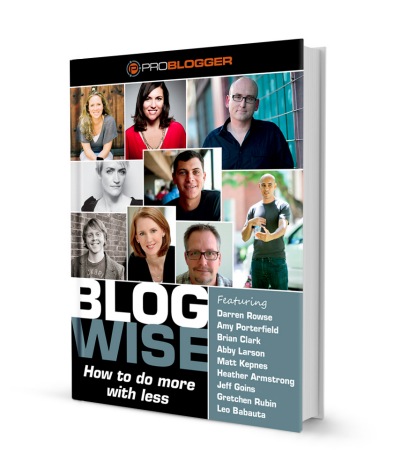
And, Darren Rowse of ProBlogger has created another fabulous resource – Blog Wise:  How to Do More with Less.  Packed with ideas for finding time to blog and including information from some of our favorite bloggers, we highly recommend this new e-book.

Tell us, what are your thoughts on Pinterest?  Or share your best photography tip or tutorial.   Or give us a suggestion for finding time to blog.   Or all three!  Happy weekending!

distractions, pinterest, and google webmaster tools

Jeff Goins’ site is one of our favorite for writers.  I’m personally looking forward to hearing him speak (and hopefully meeting him!) at Blissdom later this month.  Distraction-Free Writing was a guest post on his blog this week and it was excellent.  Succint but practical ideas for eliminating distractions as you write.  Ethan Waldman, the guest who wrote the article, offered up tools and tricks that will work for just about anyone.  A definite must-read for all of us who write.

Author Media is another fabulous resource for writers.  This week they had a couple of great posts on how authors can use Pinterest.  If you haven’t joined the Pinning frenzy, this might be just the impetus you need.  Set Up Your Author Pinterest Profile in 10 Easy Steps  and 3 Ways Authors Can Use Pinterest Guilt-Free … good stuff.

Finally, Tentblogger has been doing an easy-to-follow series on using Google Webmaster Tools.  If you haven’t been following along, you definitely want to read these.  This week he concluded with 3 Tips to Remember When Using Google Webmaster Tools.

What are your favorite sites for writing and blogging resources?