building an effective social media strategy {part 5}

building an effective social media strategy - part 5

We’ve spent the past month exploring social media and answering questions about building an effective social media strategy. I hope you have been following along with us and finding the information encouraging and useful. Here is a quick recap of the previous posts:

Part 1: 3 biggest issues with social media {overwhelm, uncertainty, and usage}

Part 2: 3 keys to a strategy that works {schedule, specify, and specialize}

Part 3: 3 questions to help you identify the goals for your blog {and how social media is a part}

Part 4: 6 questions to help build your strategy

It takes discipline not to let social media steal your time.

Alexis Ohanian, co-founder of Reddit
[Read more…]

3 ways to use instagram as a blogger

3 ways to use instagram as a blogger - design by insight

Instagram is my favorite social media platform right now! I love scrolling through my feed and seeing the smiles and adventures my friends are having. For me, Instagram is primarily a fun social media tool. But how can you best use Instagram as a blogger?

There are several ways bloggers are using Instagram intentionally for growing their audience. Learning to use the tools available to us is important for bloggers. Here are three ways you can use Instagram with greater purpose and focus for your blog.

behind the scenes look at blogging, writing, etc.

Pictures of your work space, writing process, and work in progress are great ways to invite your Instagram followers to check out your blog or books. People love to be a part of something “behind the scenes.”  Regardless of your blogging niche, there are ways to share what happens before you hit publish on that post.  Jessi Connolly is one of the bloggers using Instagram in this way most powerfully. She shares images of new projects and clearly spends time crafting not just her photos but also her captions and hashtags to convey her message. But she does so in a way that doesn’t feel sales-driven.

daily life snippets

Tricia Goyer is awesome at this! Her Instagram is full of real life. By sharing images from her daily routine, she allows us to understand she is a mom and wife and homemaker … and we connect with her even more. Plus, she has shared photos of her hair in foils! That is a brave woman. Share the not so perfect moments of your life … the dinner that burned, the laundry piles, the outfits that didn’t work. Readers want to know you are a real person.  As you share, you will build community with your readers.

post research

I love to test post ideas on Instagram. It’s not scientific but it does give me a good feel for what people are interested in and connect with. I will often share a quote or image and gauge response to help me decide how to approach a topic on my blog.  My February series, 28 Days 28 Ways, was the result of Instagram research. I noticed an increase in connection when I shared images of Scott and me doing things together and ways I was investing in our marriage.

Social media changes so quickly and one of the biggest challenges for us as bloggers is learning to use each tool in our arsenal with the best results. Think outside the box and consider how you can use Instagram {and other social media platforms} in a new way to help you as a blogger.

What is your favorite social media platform?

7 must haves in my everyday blogging toolbox

7 must haves in my everyday blogging toolbox

One of the most common questions I get asked by other bloggers and by my coaching clients is, “How do you do your images?” We bloggers are always looking for great tools, aren’t we? As I have worked on my Blogging 101 and Beyond the Blogging Basics talks for She Speaks, I’ve been taking notes about my process for developing, writing, and promoting posts. I have lots of tips, tricks, and tools I use as a blogger. Most of us do, I imagine.

Today I thought I’d share the seven tools I use every. single. day as a blogger. For me, these are the must haves in my blogging toolbox!

Picmonkey for images

I wish I were as talented as Erin and Phil at graphics, but, alas, I am not. Picmonkey is my go-to photo editing and designing tool of choice. I do have the “royal” membership which costs $33 per year and gives me access to all the fonts and extras available. But the free membership will do everything most bloggers need. With Picmonkey you can add text to images, create collages, and even use a blank canvas to make your own graphics from the elements they offer. I use Picmonkey every day for blog post images {except the ones for posts on DBI which are done by Erin} as well as buttons for my sidebar, Facebook cover images, Instagram posts, etc.

Feedly for reading blogs

I subscribe to over 300 blogs via RSS. Obviously I don’t get those in my inbox every day. {Yikes! Can you imagine?} My reader of choice is Feedly. I tried several different readers when Google Reader was discontinued and landed on Feedly because it looks great on my computer, my iPad, and my iPhone and has all the functionality I needed including the ability to save and share. I have all the blogs I subscribe to divided into categories so I can quickly scan ones on different topics. Erin wrote a great post on reader options last year if you want information about other options.

Pocket for saving information

As a social media coach, I often read articles I want to save for future reference. As a blogger, it is common for me to read a post I want to mention to my readers or on social media. As a speaker, I like to save illustrations and statistics to use in talks. But I don’t like to have all this information in my bookmarks or email. Hello, Pocket! I just add all those posts and articles and images to my Pocket where I can tag them for easy searching later.  And, one of my favorite features of Feedly is the ability to save posts to Pocket.

JetPack Stats for evaluating posts

JetPack is super simple and definitely a tool I use every day {multiple times every day if I’m honest}.  For me, JetPack Stats is less about page views and more about referral sources. For example, Pinterest is my top referral source after search engines. I often click on the links to the pins in my referral list and leave a quick comment on the pin to thank the pinner for sharing my post.  I also use JetPack to share older posts on Facebook, Instagram, and Twitter. When a post from a year or two ago is viewed multiple times in a day, I will share that link via social media. And I always make note of the search engine terms leading to my blog — this is a great way to know what to write!

Google Analytics for evaluating posts

Google Analytics is my go to research point for my blog. The most important information I get from Analytics is the referral information. Analytics provides far more detail in this area than JetPack. I especially use this information to determine how much impact posts I write on other sites has on my blog. For example, besides DBI, I write for three other sites every month. I track the referrals from these sites. I have used this information to determine if I should continue to write for specific sites. Another great piece of information I gain from Analytics is behavior flow … what are readers doing when they get to my site.

Instagram for sharing posts and more

I LOVE Instagram! It is my very favorite social media site. There are countless ways I use it {and even more ways I have noticed others using it}. The two main uses I have for IG are sharing posts {which means I need square images!} and testing out post ideas. The first one is pretty self-explanatory, but here is what I do with the second. Often I share a quote or thought I’ve had after reading a book or listening to a talk. I gauge response to those posts to determine if they are the type of idea worth expanding into a blog post. IG is also a great way to connect with others and build community.

Pinterest for exploring post ideas and updating graphics

Pinterest, as I mentioned above, is a fabulous referral source for me. But I also use Pinterest for research. Did you know you can see what posts have been pinned from your website? Go to www.pinterest.com/source/designbyinsight.net {insert your blog name in place of ours}. I check this every day for all the sites I write for. I want to know if my posts are pinning — and what other posts from those sites are especially popular. This helps me formulate post ideas and determine what sort of graphics are pinning well. I also check this for my personal blog as well for the same reasons.  However, I have found an additional benefit to checking Pinterest this way: updating post images. If you started blogging pre-Pinterest, you remember we didn’t always add text to our images.  When I notice a post is pinned without a text-enhanced image, I make a priority of updating the image.

So there you have it, my everyday tools for blogging. What are the must have items in your blogging toolbox?

pinterest, photography, and problogger

Have you read all the posts lately about Pinterest?  There is a growing concern about the legality of many uses of Pinterest.  Amy Andrews has written an excellent summary of several of these posts and shares the changes she is making regarding pinning.  {Check out Erin’s color and typography boards and I’ve got a social media board.}

We know how much bloggers love great images and with all these concerns about copyright and fair usage, many of us are getting serious about learning to use our DSLRs and even our iPhones to create the photos we use on our blogs.   Michelle is one of our bloggy friends and she is also a great photographer.  This week she shared some tips for using Instagram.

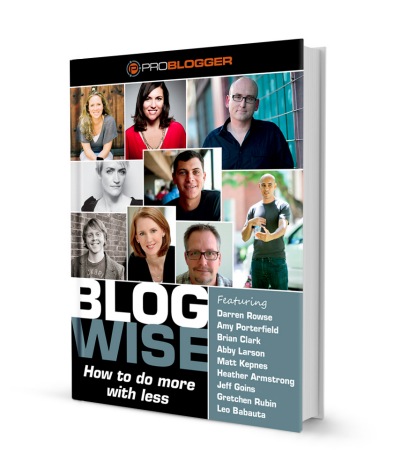
And, Darren Rowse of ProBlogger has created another fabulous resource – Blog Wise:  How to Do More with Less.  Packed with ideas for finding time to blog and including information from some of our favorite bloggers, we highly recommend this new e-book.

Tell us, what are your thoughts on Pinterest?  Or share your best photography tip or tutorial.   Or give us a suggestion for finding time to blog.   Or all three!  Happy weekending!